
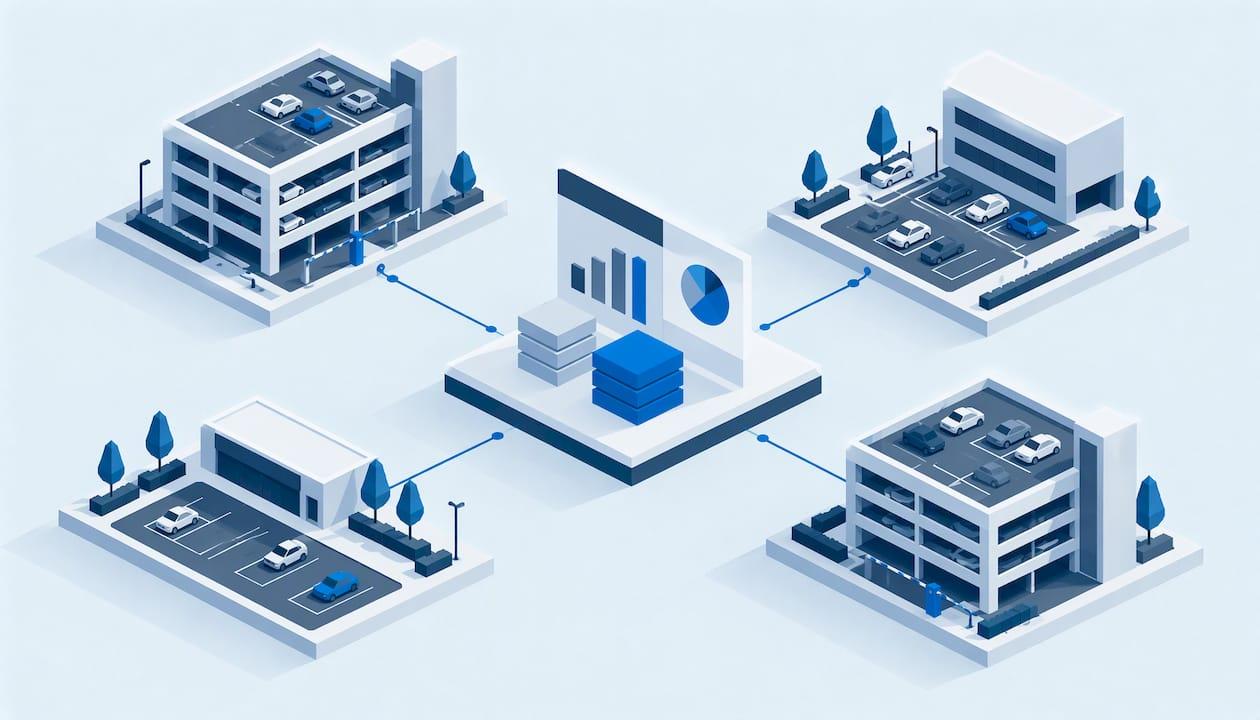
Good parking revenue reporting answers one question: does every dollar the system says it earned match a payment, a permit and a deposit? For a property manager, hotel operator or HOA, that means pulling permits, guest passes, violation fees, towing charges and payments into one record per vehicle, then reporting on it daily, weekly and monthly. When those items live in separate tools, the reports disagree and nobody can say why. When they share one record, the variance is visible the day it happens. This guide shows what to report, how to reconcile it and how to roll it up across properties.
TL;DR
- Parking revenue reporting is a reconciliation exercise first: system revenue, payments collected and bank deposits must agree, and public audits show what happens when they cannot.
- Report in three layers: a short daily exception view, a weekly trend view and a monthly financial package by revenue category.
- Keep permits, guest parking, violation fees and towing on separate revenue lines, coded the same way at every property.
- Fragmented systems are the main reason totals do not tie out. One record per vehicle, with an audit trail, removes most manual matching.
- Tax and filing rules differ by city and state, so build the report so it can be cut by jurisdiction.
Table of Contents
- What parking revenue reporting actually covers
- The audit lesson: totals without transaction detail do not hold up
- Three layers of reporting: daily, weekly, monthly
- Which income lines to track at every property
- How to reconcile parking revenue step by step
- Reporting across multiple properties
- Four reports that defend your permit and violation policy
- Local tax and filing rules differ by city
- What to look for in reporting software
- Our perspective
- See the reporting on your own properties
- FAQ
- Sources
What parking revenue reporting actually covers
For a residential or hospitality property, parking income is rarely one stream. It usually includes resident and vendor permits, guest or visitor passes, hotel validations, violation fees, towing-related charges and late fees. Reporting means showing each stream, who paid, when, and whether the money reached the bank.
Industry guidance describes the reporting categories in operator terms. Parking Professional's control-systems guide lists standard operational reports such as occupancy by hour, day and zone, revenue by payment type and rate category, transaction volume at entry, exit and payment points, and credential usage including permit activity and validation redemption. Those translate directly to a multifamily or hotel setting: permit activity is your resident roster, validation redemption is your hotel folio posting, and payment type is your card, app and invoice mix.
The search results for this topic are dominated by consumer-facing collection and ticket-dispute pages. This article is for the person on the other side: the manager who administers the policy and has to prove the numbers.
The audit lesson: totals without transaction detail do not hold up
City auditors have documented what weak parking reporting looks like, and the findings apply to any operator.
The Long Beach City Auditor's 2018 Parking Revenue Controls Audit found the city lacked complete transactional usage data to support and reconcile reported revenue in a timely way. It recommended depositing revenue within 24 hours, checking sequential receipt numbers against deposit slips, and requiring daily activity reports and monthly reconciliations from the vendor.
The Los Angeles City Auditor's audit of its parking contract, published in the same 2018 report, noted that validation usage was reported only as invoices and summary tables. Without the number of validations or the rates charged, the city could not verify that the amounts covered all activity. The same report describes a daily review of account information, a 24-hour check on credit card transactions that fail to clear, and monthly bank reconciliations.
The Metropolitan Nashville internal audit of parking management points the same way. It recommends periodic reconciliations between bank statements and supporting documentation, documented and retained, with parking revenue recorded within two business days of receipt.
The pattern is consistent. A summary is not a report. A report is a summary you can click through to the vehicles, permits and payments behind each line.
Three layers of reporting: daily, weekly, monthly
Different people need different views. Trying to give everyone one giant monthly spreadsheet is why reports arrive late and get ignored.
Daily: exceptions, not essays
The daily view is for the on-site or regional manager. It should be readable in minutes and built to surface what is wrong:
- Total transactions and gross revenue by category (permits, guest passes, validations, violation fees)
- Payments by method
- Voids, refunds and waived fees, with who approved each
- Violations issued and violations paid
- Any payment that did not settle
The audit checklist from Parking Professional suggests investigating void rates above 1 to 2 percent monthly, reviewing exception logs weekly and reconciling the access-control system to deposits daily. Use those as starting thresholds, then tune them to your own volume. A 200-unit building with a handful of daily transactions will see a single waived fee swing the percentage, so look at the dollar amount and the approver as well.
Weekly: patterns
The weekly view is for the portfolio or regional manager. It answers whether something is drifting:
- Revenue against the prior week and the same week last year
- Guest pass volume by property and day of week
- Permit starts and cancellations
- Violation counts by type and location
- Repeat-vehicle activity
Parking Professional's occupancy reporting piece names revenue per occupied stall-hour as a way to compare days with different occupancy. For residential properties, a simpler equivalent is revenue per assigned or leasable space per month, because it lets you compare a 90-space garage with a 400-space community on the same scale.
Occupancy trends also feed pricing and capacity decisions. If you are weighing those, our guides on parking capacity planning and a 3 to 6 month parking data analytics pilot show how to use the weekly view.
Monthly: the financial package
The monthly package goes to ownership, investors, the board or the finance team. It should show:
- Revenue by category, with budget against actual and a year-to-date column
- Revenue per space
- Receivables aged past 30 days (unpaid permit fees, invoiced vendor permits, outstanding violation fees)
- Recurring income separated from one-time fees
- Event or special-use revenue footnoted on its own
- A variance summary: what did not reconcile and how it was resolved
Keep recurring permit income apart from non-recurring violation and towing fees. Mixing them makes a property look healthier or weaker than it is, and it hides the trend owners care about most.
Which income lines to track at every property
The most common reporting failure in multi-property portfolios is inconsistency: one site books guest parking as "other," another books it under amenities, a third nets violation fees against towing costs. Totals then cannot be compared or rolled up.
Decide the chart once and apply it everywhere:
| Revenue line | What it includes | Why separate it |
|---|---|---|
| Resident permits | Assigned, reserved, covered and storage parking | Recurring, forecastable |
| Vendor and contractor permits | Time-limited credentials | Different rate and term |
| Guest and visitor parking | Paid passes, QR registrations, hotel validations | Volume-driven, shows demand |
| Violation fees | Fees charged under your policy | Non-recurring, tied to enforcement |
| Towing-related charges | Fees and recoveries linked to tows | Needs its own documentation trail |
| Late fees and adjustments | Late permit payments, waivers, credits | Shows leakage |
Hotels have a further requirement. The industry's Uniform System of Accounts for the Lodging Industry (USALI) covers parking among its metric areas, and as summarized in Hospitality Trends, its recommended tables let owners and operators compile comparable reports and track actual results against budget. If you report to a hotel owner, map your parking lines to the format they already use.
How to reconcile parking revenue step by step
Reconciliation is the part of reporting that protects you. Here is the routine, with where it usually breaks.
Step 1: Define the four things that must agree
For any property, compare what the system recorded (permits issued, guest passes, violations charged), what was collected (card, ACH, cash, invoice), what the processor settled, and what hit the bank. Parking Professional describes revenue reconciliation as confirming every dollar the system recorded was collected and deposited, by comparing against processor settlements, cash counts and bank deposits.

Where it breaks: when permits are tracked in a spreadsheet, guest passes in a portal and violations in a paper log, nobody owns the comparison. You can end up reconciling three exports by hand every month.
Step 2: Reconcile daily, investigate the same day
The audits above all point to short cycles: 24-hour deposits, 24-hour clearing checks, two-business-day recording. Daily reconciliation keeps variances small enough to explain. A discrepancy found on day two is usually a failed payment or a mis-keyed permit. Found on day thirty, it is an argument.
Where it breaks: waiting for month-end close. By then the person who issued the waiver has forgotten why.
Step 3: Tie every charge to a vehicle and a permit
A payment with no vehicle behind it is hard to defend, and a violation fee with no permit history is hard to collect. Our platform is built around a single record: access, permits, violations, payments and towing activity tied to historical vehicle records. That means a fee on the report links back to the vehicle, the permit status at the time and the actions taken, instead of being a standalone number.
Where it breaks: when the resident roster lives in your property management system and the parking list lives somewhere else. Matching the two is the slowest part of month-end. Our PMS integrations and parking data reconciliation page covers how we approach it, and our hotel parking validation guide explains how to test validation and folio posting before you commit to a system.
Step 4: Log every exception with a reason and an approver
Voids, waivers, refunds and manual overrides are where leakage hides. Require a reason code and a name on each one, and review the log weekly. This is a separation-of-duties control: the person who can waive a fee should not be the only person who reviews waivers.
Where it breaks: waivers granted by text message or in the leasing office, with nothing recorded. An audit trail that logs who changed what, and when, closes that gap.
Step 5: Document and retain the reconciliation
The Nashville audit specifically calls for reconciliations that are documented and retained. Keep a dated record of each reconciliation, the variances found and the resolution. If a board member, owner or auditor asks about a quarter from a year ago, you should be able to answer from the file.
Reporting across multiple properties
Once each site reconciles, the portfolio view becomes a roll-up rather than a rebuild. A few rules make that work:
- One chart of revenue lines for every property, as in the table above.
- One definition of each metric. Revenue per space should use the same space count rule everywhere (assigned, leasable or total).
- Property-level and portfolio-level views from the same data. Investors want to see parking at both levels, and totals should match when drilled down.
- Role-based access. On-site staff see their property, regional managers see their group, ownership sees the portfolio.
- Consistent workflows. If one property issues a warning before a fee and another does not, violation revenue is not comparable. Custom workflows let you set the policy per property and still report on one standard.
Our platform supports multi-property and portfolio reporting with role-based user management and customizable workflows, so each property can run its own policy while the numbers still roll up to the same report. See the features page for the full list.
Four reports that defend your permit and violation policy
Reporting is not only about money. Boards and residents challenge fees, and the best defense is a record. Four reports are worth having on file: permit issuance by unit and vehicle, permit status at the time of each violation, violations by type and location, and the towing record for each tow. Our guide to four reports that defend your parking permit policy walks through them, and the defensible towing record guide covers what to document before a tow.
Enforcement data is also a planning tool. Parking Professional notes that violation rates by time, location and type support targeted enforcement with minimal staffing, while edge cases such as expired permits, changed vehicles and event exceptions still need human judgment backed by system data.
Local tax and filing rules differ by city
In the U.S., parking taxes and filing requirements are set locally, so build your report so it can be cut by jurisdiction. Two examples show how different they are.
Pittsburgh's parking tax form requires operators to file by the 15th of each month for the prior month's collections. It asks for daily starting and finishing ticket numbers and gross collections broken into Day, Night, Event, Lease and Other categories. Late filing carries 1 percent monthly interest and a 5 percent monthly penalty, capped at 50 percent.
New Jersey applies a sales tax to parking receipts with exemptions, such as residential parking, which means mixed-use facilities need records that substantiate which transactions were exempt. Confirm current rates and exemptions with the New Jersey Division of Taxation before you file.
For your own property, ask your accountant or tax adviser which local parking, sales or occupancy taxes apply, and which revenue categories they require. Then make sure your report can export those categories without reworking the data.
Public agencies show how scale changes the picture. The Miami Parking Authority's FY2021 annual report reports total revenues of $47.3 million, including $44.8 million in parking revenue and about $14.2 million in enforcement fine revenue generated for the City and Miami-Dade County. Notice that enforcement revenue is reported as its own line, not folded into parking revenue. That is the same separation we recommend for a residential or hotel property.

What to look for in reporting software
Whatever you use, test it against this list:
- Can you click from any total down to the vehicles, permits and payments behind it?
- Does it keep an audit trail of changes, waivers and overrides?
- Can each property have its own workflow while reporting to a shared standard?
- Does it reconcile with your property management or hotel system instead of requiring re-keying?
- Can you control who sees which property?
- Can it be deployed the way your IT policy requires: hosted, client-hosted or white-label?
Our platform is built to those points. It covers guest access, resident and vendor permits, violations, payments and towing in one interface, with audit capabilities, financial oversight and multi-property reporting, and it supports hosted SaaS, client-hosted installations and white-label options.
Our perspective
Most reporting problems we hear about from property teams are not math problems. They are record problems. A fee shows up on a report, and nobody can say which vehicle, which permit and which approval sits behind it.
We built MyParkingMgr around one unified record for access, permits, violations, payments and towing, so the report is a view of the record and not a separate project at month-end. Every change leaves an audit trail, which means a waived fee or an overridden permit can be explained months later.
We also believe each property should keep its own workflow. A hotel, a garden-style apartment community and a gated HOA do not enforce the same way. Customizable workflows let each one operate its own policy, while portfolio reporting keeps the numbers comparable for the people who own the results.
If your team spends the first week of every month matching exports from separate tools, that time is the cost of a fragmented system, and it is the first thing a unified platform gives back.
MyParkingMgr
See the reporting on your own properties
If your parking data sits in several tools, the quickest way to judge a unified record is to see your own permits, guest passes and violations in it. We offer free on-boarding at 0 USD one-off, and you can start with a demonstration or review the parking management platform. For a portfolio with specific reporting or deployment needs, ask for a proposal.
FAQ
What should a daily parking revenue report include?
Gross revenue and transaction counts by category, payments by method, voids and refunds with approvers, and any payments that failed to settle. Add comparisons to the prior day and the same weekday last week so anomalies stand out. The goal is a review short enough to do every day.
How often should parking revenue be reconciled?
Daily where there is volume, and no less than weekly for small properties, with a documented monthly bank reconciliation. City audits in Long Beach and Nashville point toward deposits and recording within one to two business days and monthly documented reconciliations.
How do I report guest parking and violation fees separately?
Give each its own revenue line, coded the same way at every property. Guest parking is demand-driven income, while violation fees are tied to enforcement and are not recurring. Separate lines let owners see the real trend in each.
Do parking revenue reporting rules differ by state?
Yes. Taxes, exemptions and filing schedules are set by states and cities, as Pittsburgh's monthly parking tax return shows. Ask your accountant which rules apply to your locations, and keep revenue categories detailed enough to export what each jurisdiction asks for.
Sources
- Parking Revenue Controls Audit, Long Beach and Los Angeles City Auditor (2018)
- Audit of Metropolitan Nashville Public Works Parking Management (FY2015)
- City of Pittsburgh parking tax form PT 2025
- Miami Parking Authority FY2021 annual report
- The Complete Guide to Parking Control Systems, Parking Professional
- Parking Operations Audit Checklist, Parking Professional
- Parking Occupancy Data Reporting, Parking Professional
- Uniform System of Accounts for the Lodging Industry, Hospitality Trends